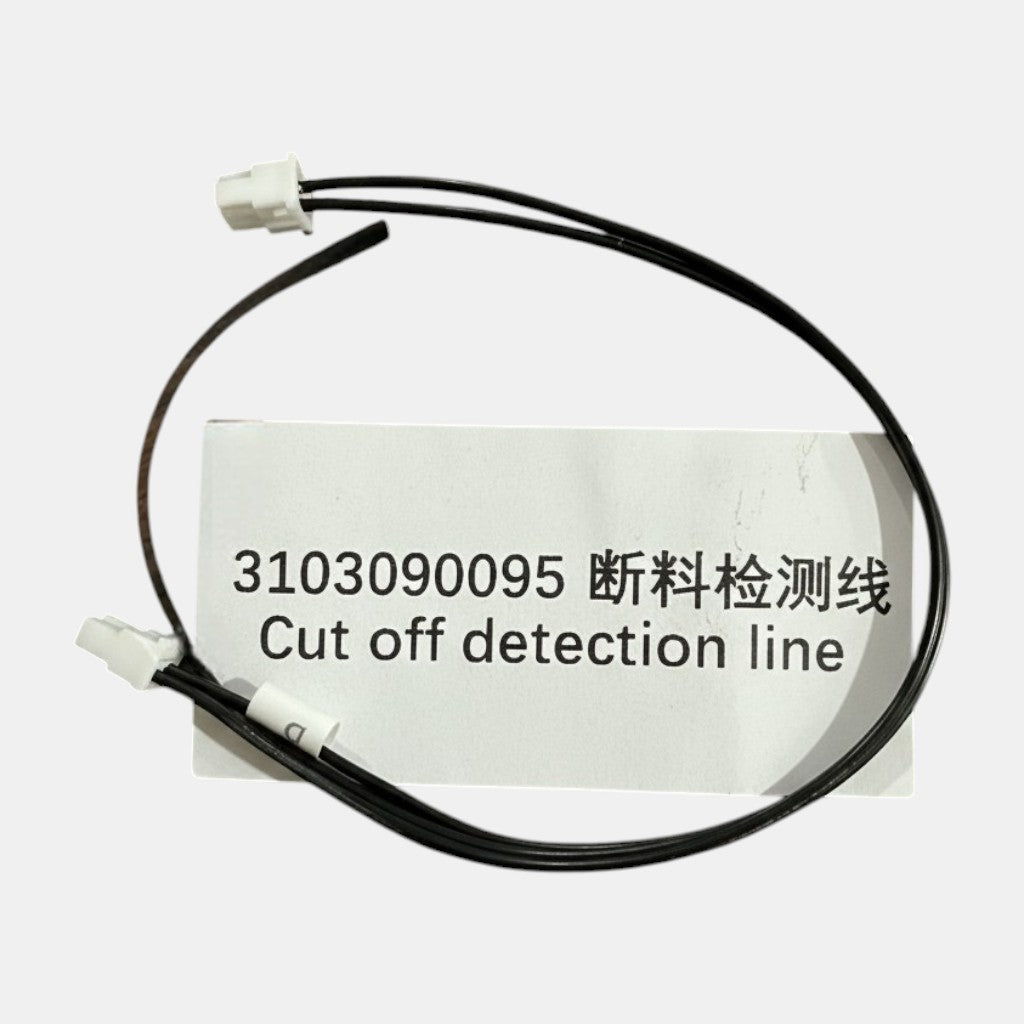
Creality K2 Series & Creality HI Cutter Detection Cable or Filament Sensor Runout Cable Replacement
Handmade USA Replacement Cable for K2, K2 Plus, K2 SE & Creality HI Printers
🔧 Finally… A Fix You Don't Have to Beg Support For.
If you own a Creality K2 Series or Creality HI printer, chances are you've already discovered the legendary "mystery cable" that loves to fail at the worst possible time 😅
This handmade replacement Cutter Detection Cable was created because these cables are nearly impossible to source in the United States without going through Creality support, waiting on overseas shipping, and sacrificing at least three emotional support snacks during the process.
So we decided to fix that problem ourselves.
Built and tested by fellow printer nerds, this replacement cable is designed to help get your K2 or HI back up and running quickly without the headache of hunting down impossible-to-find parts.
🛠️ Compatible Printers
- Creality K2
- Creality K2 Plus
- Creality K2 SE (Partial Replacement Length)
- Creality HI (same connectors and cable size all the way around — works as a replacement for the HI cut-off detection line, part #3103090102)
⚠️ Important Note for K2 SE Owners:
This cable works as a partial replacement for the K2 SE and may require routing adjustments depending on your setup.
✨ Why These Cables Matter
The factory cable routing on many K2 and HI machines places stress on the wires near the extruder assembly, which can lead to pinched wires, shorts, or cutter-detection issues over time.
Symptoms may include:
- Cutter errors
- Filament detection failures
- Random printer stoppages
- Extruder communication issues
- Sudden "why is my printer yelling at me?" moments
🗂️ Model-to-Part Reference Table
| Printer Model |
Part Number |
Cable Function |
Notes |
| Creality K2 |
#3103090095 |
Cutter Detection / Filament Sensor |
Full-length replacement |
| Creality K2 Plus |
#3103090095 |
Cutter Detection / Filament Sensor |
Full-length replacement |
| Creality K2 SE |
#3103090095 |
Cutter Detection / Filament Sensor |
Partial replacement; routing adjustments may be needed |
| Creality HI |
#3103090102 |
Cut-off Detection Line |
Same connectors and cable size; direct replacement |
🔍 Quick Connector-Swap Diagnosis
Before replacing the cable, confirm you have the right fault by running through these checks:
-
Cutter error on screen? — Disconnect the cutter-detection connector at both ends, inspect pins for bent contacts or corrosion, then reconnect firmly. If the error clears briefly and returns, the cable is the likely culprit.
-
Filament runout false-triggers? — Wiggle the harness near the extruder head while the printer is idle. If the runout sensor state flickers in Creality Print, the wire has an intermittent break — replace with #3103090095.
-
Creality HI cut-off detection fault? — Swap to #3103090102. Verify the two connector housings click fully home on the new cable before powering up.
-
No obvious error but printer stops randomly? — Check for chafed insulation along the drag-chain path; a pinched wire can cause intermittent shorts that trigger safety shutdowns.
📋 Installation Steps
Tools needed: Small flat-head screwdriver, Phillips #1, zip ties (optional).
-
Power off and unplug the printer completely before touching any wiring.
-
Open the extruder-head cover by removing the two Phillips screws on the front panel.
-
Locate the existing cable — it runs from the extruder assembly down through the drag chain to the mainboard.
-
Photograph the routing before disconnecting anything — this saves a lot of guesswork on reassembly.
-
Disconnect both connectors (extruder end first, then mainboard end), pressing the locking tab while pulling the housing straight out.
-
Feed the new cable through the drag chain following the same path as the original. Avoid sharp bends.
-
Connect the mainboard end first, then the extruder end — listen for the audible click on each connector.
-
Re-route and secure any slack with zip ties, keeping the harness away from moving parts and heat sources.
-
Replace the extruder cover and power the printer on to verify the error is cleared.
📖 For Creality's official K2 Plus replacement walkthrough, refer to the Creality K2 Plus official page and the support documentation linked there for your specific model.
🇺🇸 Handmade in the USA
Each cable is hand-assembled and tested in small batches right here in the United States to help fellow makers avoid long support delays and expensive downtime.
No waiting weeks.
No support ticket roulette.
No carrier pigeon required.
📦 What's Included
- 1x Handmade Cutter Detection Replacement Cable
- Carefully packaged and labeled
- Optional installation guidance available upon request
🎯 Perfect For
- Emergency repairs
- Backup spare parts kits
- K2 & HI maintenance setups
- Makerspaces
- Print farms
- Anyone tired of waiting on overseas support tickets
😂 Dad Joke Safety Inspection
Why did the printer cable go to therapy?
Because it kept feeling disconnected 😎
And unlike the original cable…
This one actually wants a long-term relationship.
📌 Important Disclaimer
This is a handmade aftermarket replacement cable and is not manufactured by or officially affiliated with Creality. All printer compatibility references are used for identification purposes only.
🚀 Need Help?
If you're unsure whether this is the correct cable for your machine or the issue you're experiencing, feel free to reach out. We're happy to help fellow makers get back to printing awesome things.